Como Utilizar o VoipStunt com o seu dispositivo SIP
Necessita de um nome de utilizador e palavra-chave VoipStunt para fazer chamadas através da nossa rede. Comece por fazer o download da aplicação e instale-a. Registe-se e inicie sessão no VoipStunt.
Pode utilizar o VoipStunt com o seguinte tipo de dispositivos Sip:
- SIP ATA (Adaptador para Telefone Analógico)
- SIP Router
- xDSL Modem
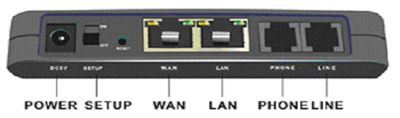
A maioria dos dispositivos está equipada com uma combinação das seguintes portas.
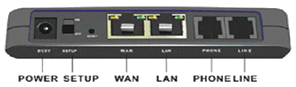
(este é apenas um exemplo e pode variar consoante o tipo de dispositivo)
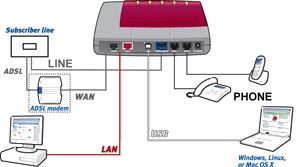
(este é apenas um exemplo e pode variar consoante o tipo de dispositivo)
- (A)DSL: ligue a linha do seu fornecedor (A)DSL (não disponível num ATA)
- WAN: ligue o seu modem/router xDSL
- LAN: porta para a sua rede (doméstica), onde pode ligar, por ex., o seu computador, o portátil, impressora em rede ou router sem fios
- TELEFON:aqui pode ligar o seu telefone analógico.
- LINHA: conecte su línea de teléfono analógica (RTPC).
- USB: pode ligar o seu computador ou portátil a uma porta USB livre
Alguns dispositivos SIP dispõem de mais do que uma porta LAN e/ou TELEFONE.
Para as ligações de hardware do seu dispositivo SIP consulte a informação acima e o manual de utilizador. Depois de ligar o hardware, certifique-se de que o software está instalado e configurado correctamente.
Configuração do software
Geral |
|
|---|---|

|
Porto SIP : 5060 |
|
|
Registro : sip.voipstunt.com |
|
|
Servidor proxy : sip.voipstunt.com |
|
|
Servidor proxy de saída (outbound): leave empty |
|
Nome de conta : o seu nome de utilizador voip |
|
Palavra-chave : a sua palavra-chave VoipStunt |
|
Nome/número de apresentação : o seu nome de utilizador/número voip |
|
Servidor stun (opcional) : stun.voipstunt.com |
|
Selecione APENAS o codec G711 a-Law como codec ativo. Todos os outros codecs disponíveis NÃO devem ser selecionados como ativos. |
Em baixo pode ver alguns exemplos de configuração de software de alguns dispositivos SIP mais conhecidos. Não dispense a consulta do manual que veio com o seu dispositivo SIP
-
(click here to expand)AVM Fritz!box FON 7050
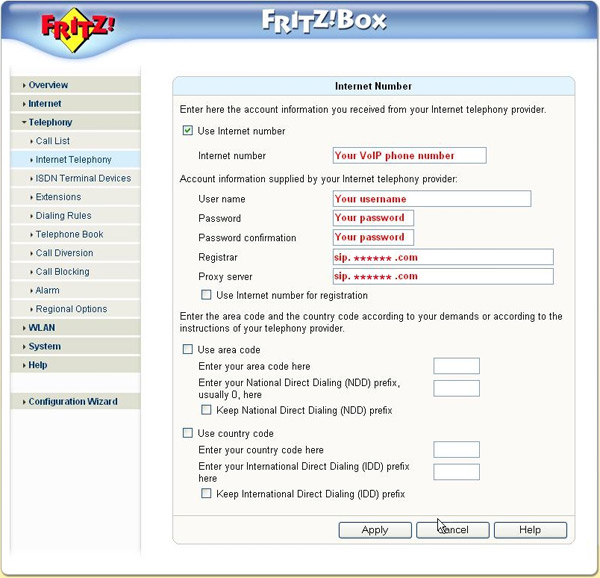
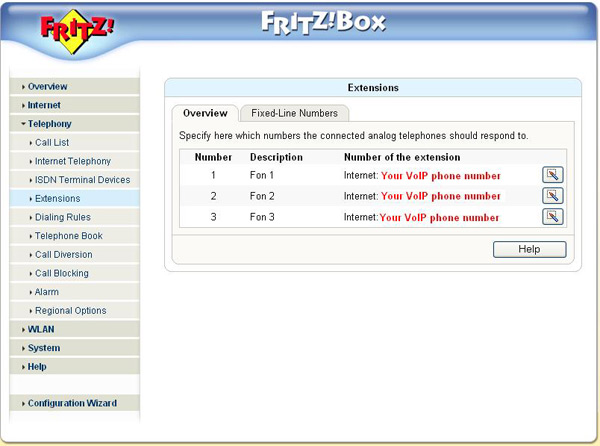
Fill in the following settings: -
 Internet number: your VoipStunt username (if available)
 -
User Name: fill in your username, this is the username you used for the registration of your VoipStunt-account
-
Password: fill in your password, this is the password you used for the registration of your VoipStunt-account
-
Password confirmation: fill in your password again
-
Registrar: this is sip.voipstunt.com
-
Proxy server: this is sip.voipstunt.com
-
Overview - number 1, 2 or 3: your VOIP phone number (if available)
-
-
(click here to expand)GRANDSTREAM HT286
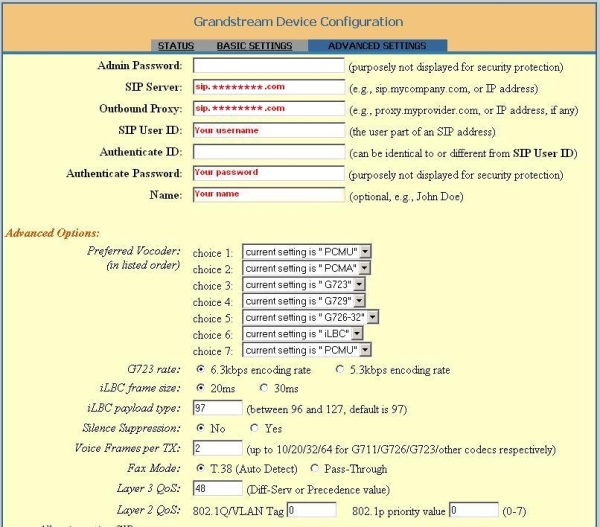
Fill in the following settings: -
SIP server : fill in sip.voipstunt.com
-
Outbound proxy : this is sip.voipstunt.com
-
SIP User ID : fill in your username, this is the username you used for the registration of your VoipStunt-account
-
Authenticate Password : your password, this is the password you used for the registration of your VoipStunt-account
-
Name : you can fill-in your name, this name will be displayed in the phone screen of the person you are calling
-
Don't change the Advanced Options
-
-
(click here to expand)GRANDSTREAM HT386
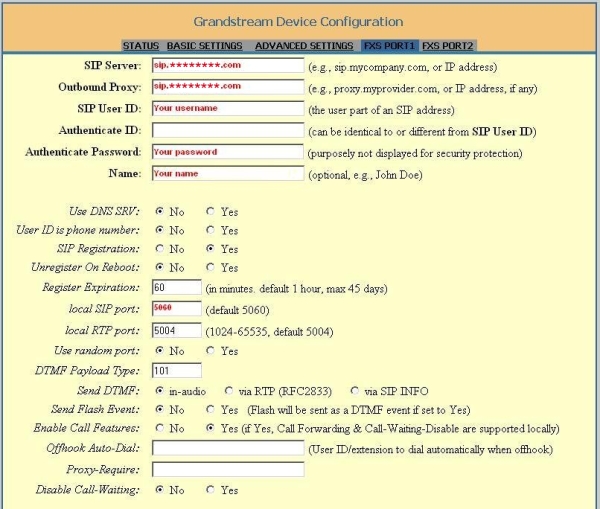
Fill in the following settings: -
SIP Server : fill in sip.voipstunt.com
-
Outbound Proxy : this is sip.voipstunt.com
-
SIP User ID : fill in your username, this is the username you used for the registration of your VoipStunt-account
-
Authenticate Password : your password, this is the password you used for the registration of your VoipStunt-account
-
Name : your name, this name will be displayed in the phone screen of the person you are calling
-
Local SIP port : fill in 5060
-
Don't change the other options
-
-
(click here to expand)GRANDSTREAM HT486
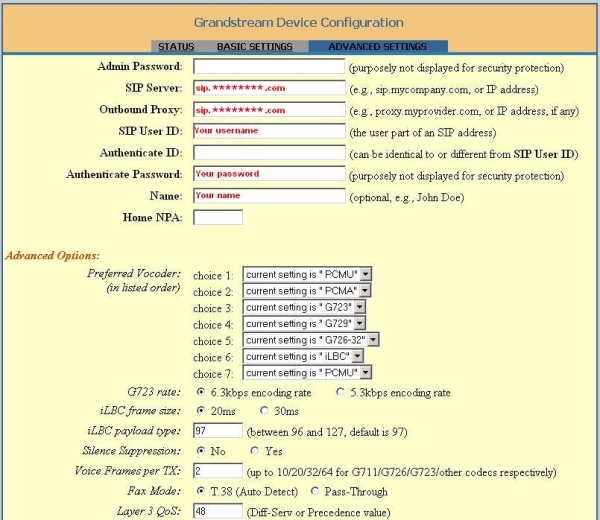
Fill in the following settings: -
SIP Server : fill in sip.voipstunt.com
-
Outbound Proxy : this is sip.voipstunt.com
-
SIP User ID : fill in your username, this is the username you used for the registration of your VoipStunt-account
-
Authenticate Password : your password, this is the password you used for the registration of your VoipStunt-account
-
Name : you can fill-in your name, this name will be displayed in the phone screen of the person you are calling
-
Don't change the Advanced Options
-
-
(click here to expand)GRANDSTREAM HT496
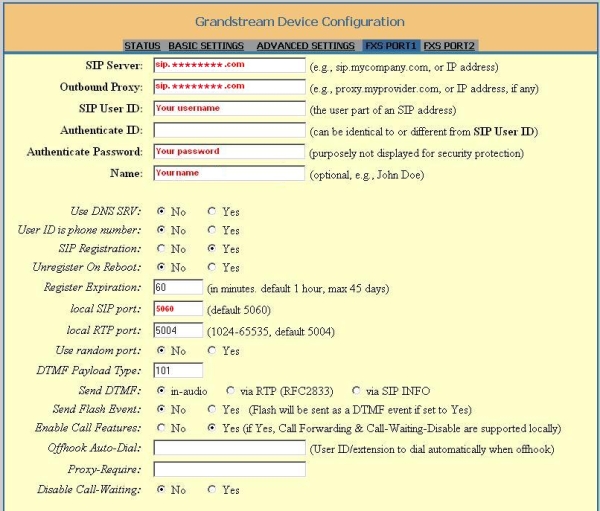
Fill in the following settings: -
SIP server : fill in sip.voipstunt.com
-
Outbound Proxy : this is sip.voipstunt.com
-
SIP User ID : fill in your username, this is the username you used for the registration of your VoipStunt-account
-
Authenticate Password : your password, this is the password you used for the registration of your VoipStunt-account
-
Name : your name, this name will be displayed in the phone screen of the person you are calling
-
Local SIP port : fill in 5060
-
Don't change the other options
-
-
(click here to expand)LINKSYS SPA3102
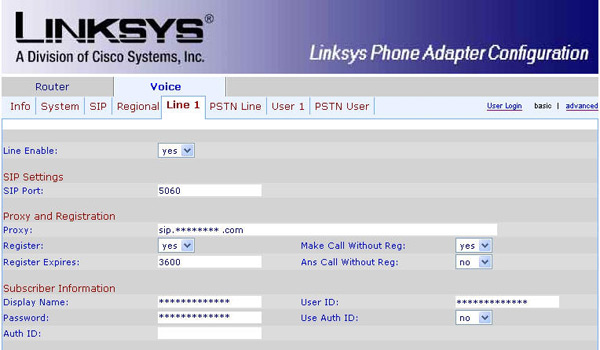
Fill in the following settings: -
Line Enable: Yes
-
SIP Port : portnumber 5060
-
Proxy: fill in sip.voipstunt.com
-
Register: this is 'Yes'
-
Make Call Without Reg: fill in 'Yes'
-
Register Expires: this is 3600 seconds
-
Ans Call Without Reg: fill in 'No'
-
Display name: you can fill-in your name, this name will be displayed in the phone screen of the person you are calling
-
User ID: fill in your username, this is the username you used for the registration of your VoipStunt-account
-
Password: fill in your password, this is the password you used for the registration of your VoipStunt-account
-
Use Auth ID: set to 'No'
-
-
(click here to expand)LINKSYS WIP330
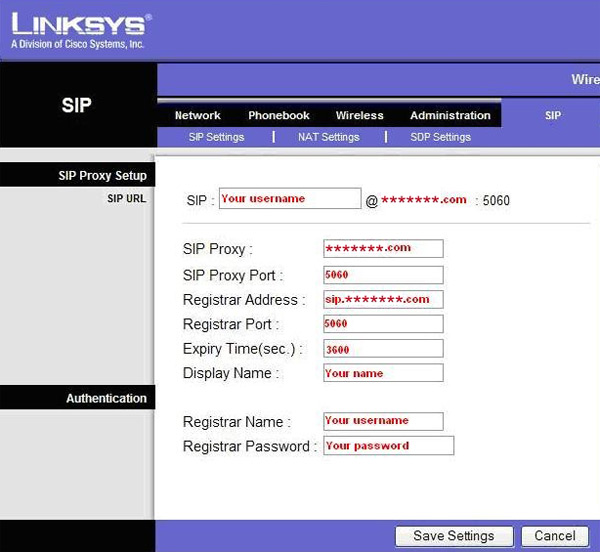
Fill in the following settings: -
SIP Proxy: fill in voipstunt.com
-
SIP Proxy Port: this is port number 5060
-
Registrar Address: this is sip.voipstunt.com
-
Registrar Port: this is port number 5060
-
Expiry Time(sec): this is 3600 seconds
-
Display name: you can fill-in your name, this name will be displayed in the phone screen of the person you are calling
-
Registrar Name: your username, this is the username you used for the registration of your VoipStunt-account
-
Registrar Password: your password, this is the password you used for the registration of your VoipStunt-account
-
-
(click here to expand)SIEMENS SX553
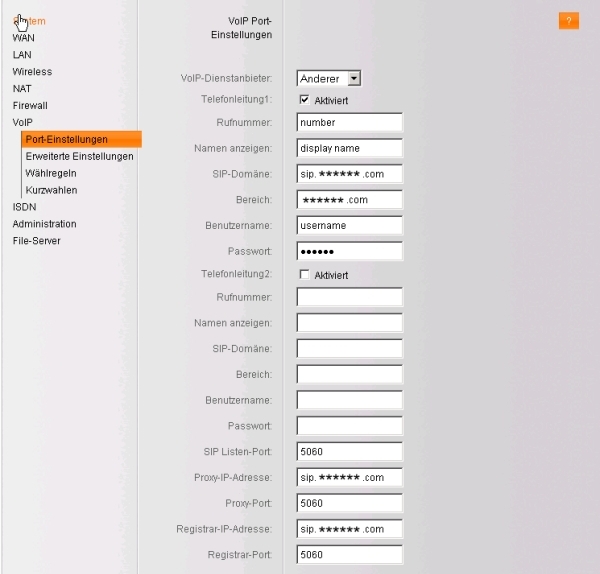
Fill in the following settings: -
Rufnummer : your VoipStunt username
-
Namen anzeigen : you can fill in your name
-
SIP-Domäne : fill in sip.voipstunt.com
-
Bereich : this is voipstunt.com
-
Benutzername : fill in your username, this is the username you used for the registration of your VoipStunt-account
-
Passwort : fill in your password, this is the password you used for the registration of you VoipStunt-account
-
SIP Listen-Port : this is port 5060
-
Proxy-IP-Adresse : fill in sip.voipstunt.com
-
Proxy-Port : this is port 5060
-
Registrar-IP-Adresse : sip.voipstunt.com
-
Registrar-Port : this is port 5060
-
-
(click here to expand)SMC 7908 VoWBRA
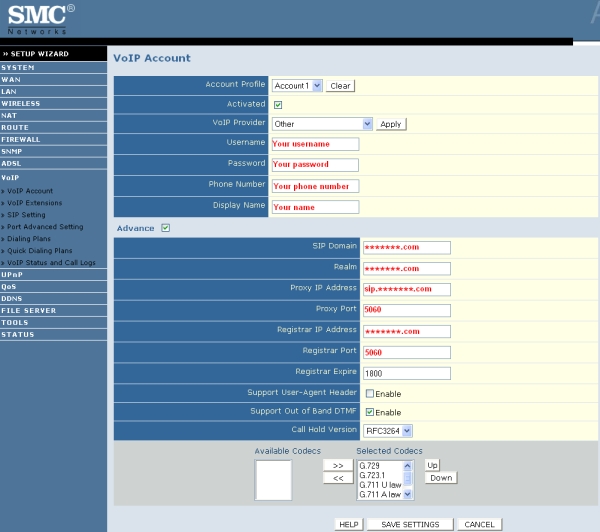
Fill in the following settings: -
Username : fill in your username, this is the username you used for the registration of your VoipStunt-account
-
Password : fill in your password, this is the password you used for the registration of your VoipStunt-account
-
Phone Number : your VoipStunt username
-
Display Name : you can fill in your name
-
SIP Domain : this is voipstunt.com
-
Realm : fill in voipstunt.com
-
Proxy IP Address : this is sip.voipstunt.com
-
Proxy Port : this is port 5060
-
Registrar IP Address : this is voipstunt.com
-
Registrar Port : this is port 5060
-
-
(click here to expand)X-lite v3.0 Software
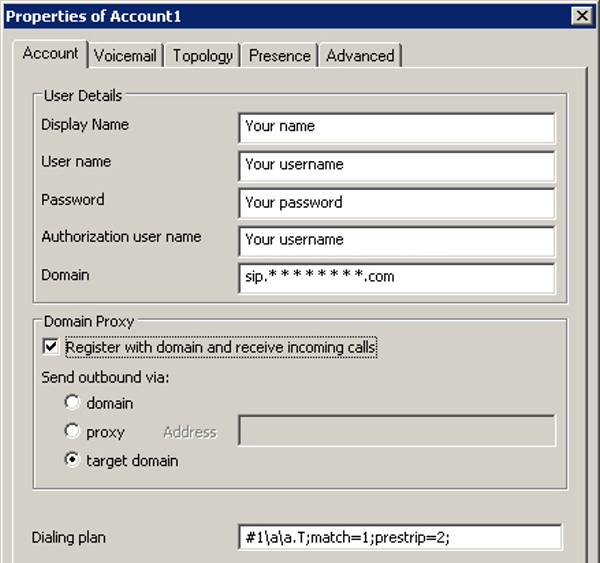
Fill in the following settings: -
Display Name : fill in your your name, this name will be displayed in the phone screen of the person you are calling
-
User name : fill in your username, this is the username you used for the registration of your VoipStunt-account
-
Password : fill in your your password, this is the password you used for the registration of your VoipStunt-account
-
Authorization user name : same as User name
-
Domain : fill in sip.voipstunt.com
-
-
(click here to expand)AVM Fritz!box FON ATA 1020
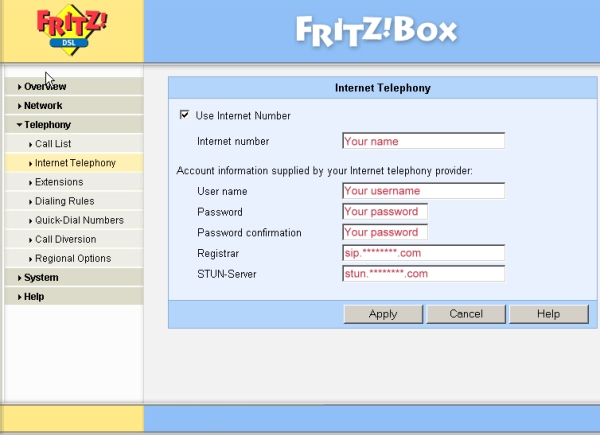
Fill in the following settings: -
Internet number: you can fill-in e.g. your name or telephone number
-
User name: fill in your username, this is the username you used for the registration of your VoipStunt-account
-
Password: fill in your password, this is the password you used for the registration of your VoipStunt-account
-
Password confirmation: fill in your password again
-
Registrar: this is sip.voipstunt.com
-
STUN-Server: this is stun.voipstunt.com
-












|
Codecs |
|
|
G.711 (64 kbps) |
|
G.726 (32 kbps) |
|
G.729 (8 kbps) |
|
G.723 (5.3 & 6.3 kbps) |
|
GSMFR (13.2 kbps) |
Si tiene problemas de sonido:
Use un servidor STUN (p. ej., stun.voipbuster.com) con el puerto 3478 (si su dispositivo lo soporta)
Use el códec G.711